

In order to comply with Twilio’s 10DLC requirements, you’ll need to make some changes to your settings in Lockii and your website.
Changes You’ll Need to Make In Lockii
Update the wording of your checkout terms.
Navigate to Lockii Settings > Preferences to modify the Short Description to:
I agree to the Rental Agreement. Booking online requires transactional SMS about your rental - if you don't want SMS, don't book online; contact us at [PHONE] or [EMAIL] instead. Msg & data rates may apply; frequency varies. Reply STOP to opt out or HELP for help
Update your contract to deal explicitly with SMS.
In the Full terms and conditions which includes your Rental agreement. You’ll need to add clause dealing with SMS opt in/out. This will change based on your specific jurisdiction, but Twilio requires that you:
Honor Opt-outs: Immediately add users who reply "STOP" (or similar keywords) to a block list and stop sending promotional messages.
Provide Instructions: Include clear opt-out instructions in your messages (e.g., "Reply STOP to opt out").
No Blanket Consent: Consent is not a condition of booking.
A template Clause is as follows:
SMS Notifications and Opt-Out
If you book online, you will receive one or more transactional SMS messages (such as booking confirmations, reminders, and pickup or return notices) at the mobile number you provide. These messages help you manage your booking, and at least one initial message will be sent as part of completing it.
You are not required to agree to receive SMS messages to make a booking with us. We will not send you marketing or promotional texts if you opt in to receive transactional SMS.
You may opt out at any time by replying STOP to any message. Once you opt out, we will add your number to our block list and send no further SMS. Reply HELP for assistance or contact us at [support email / phone]. Message and data rates may apply.
We operate our messaging in compliance with the U.S. TCPA, CTIA guidelines, and the requirements of our provider, Twilio, and each message includes clear opt-out instructions.
Changes to Your Website
Your website should include a new page which deals with SMS Consent and Explicit Opt-In.
SMS Messaging Policy
Add a page for your SMS policy. You can set this at "www.yourtrailercompany.com/SMS”
A template example is here:
SMS Messaging Policy
[COMPANY] ("we," "us") sends transactional text messages to customers who provide a mobile number and consent to receive them. By opting in, you agree to these terms.
Types of messages. We send transactional messages about your rental only. These may include:
booking confirmations
pickup location and access instructions
reminders during your rental period
rental updates
extension notices
return prompts, and
late-return notifications.
We never send marketing or promotional texts.
Message frequency. Message frequency varies based on your rental activity — typically several messages per active rental.
Cost. Message and data rates may apply, depending on your mobile carrier and plan.
Opting out and help. Reply STOP to any message to cancel; you'll get one confirmation and no further texts. Reply HELP for help, or reach us at [PHONE] or [EMAIL]
How consent works. These text messages help us manage your rental, so agreeing to receive them is part of completing a booking via our online booking system. If you'd prefer not to receive texts, you can book by phone at [PHONE] or [EMAIL] instead. We will direct you to opt in via the SMS Opt In Form on this website if you do wish to receive transactional messages about your rental.
Privacy. No mobile information will be shared with third parties or affiliates for marketing or promotional purposes, and mobile opt-in and consent information is never shared or sold. See our Privacy Policy for full details.
SMS Opt-In Form
Add a form to the SMS Terms page, offering the customer the ability to Opt In to SMS. An example is provided below.
SMS Opt In
[Company] LLC — SMS Terms & Consent
[COMPANY] uses transactional SMS to help keep you informed about the status of your booking. SMS is not a condition of your rental with us.
If you have previously opted out of SMS communications or you chose to contact us directly to rent with us, you can elect to opt in to receive SMS communications via the form below.
By Opting In, you agree to receive transactional SMS text messages from us about your rental (booking confirmations, pickup details, reminders, and return notices) at the mobile number provided. Message frequency varies. Msg & data rates may apply. Reply STOP to cancel, HELP for help.

In order to comply with Twilio’s 10DLC requirements, you’ll need to make some changes to your settings in Lockii and your website.
Twilio Campaign Form
Start the campaign registration. In the Twilio console, open the campaign registration and click Start.
Select the use case
Open the use case drop-down and choose Account notification.
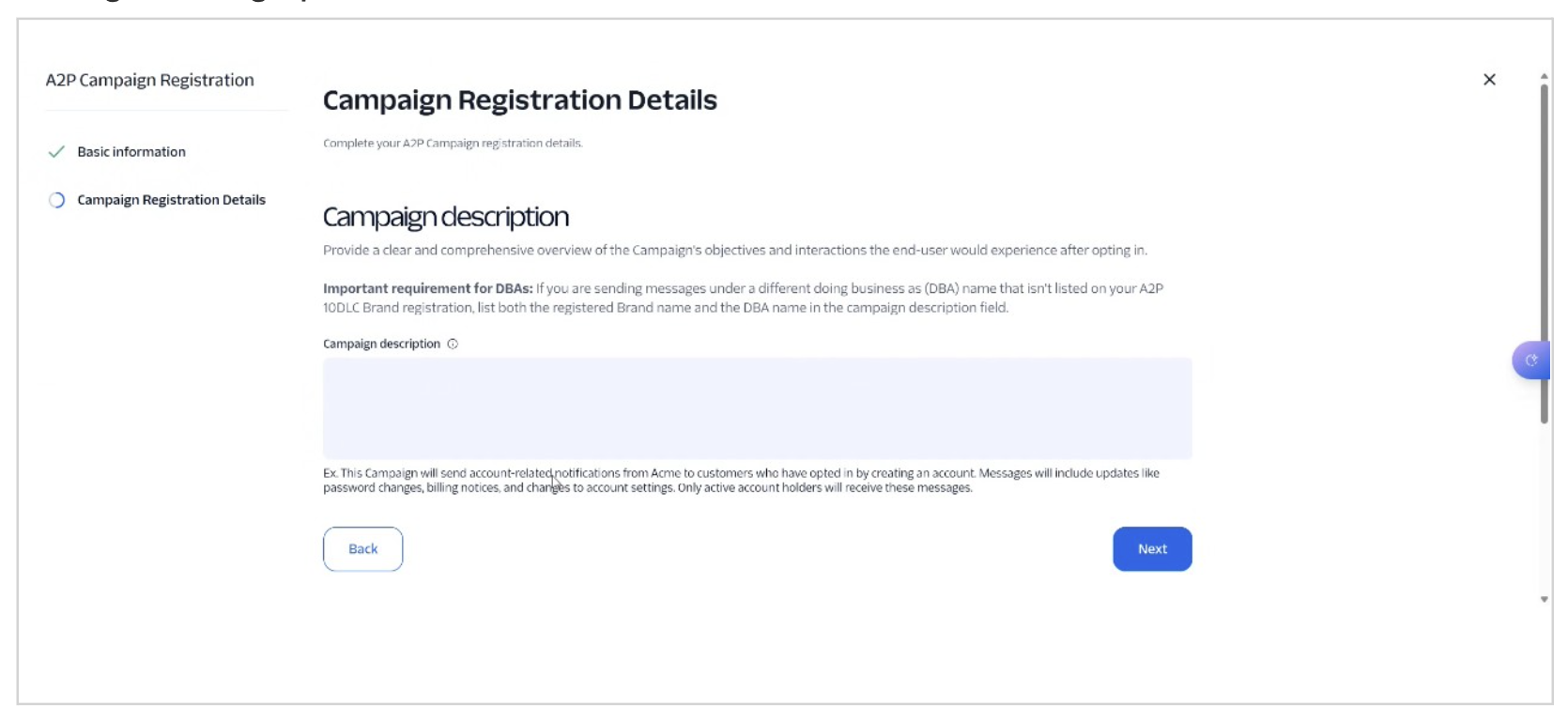
Campaign description
Enter the following:
“We use transactional SMS to help keep customers informed about the status of their rental booking. SMS is not a condition of your, bur required for bookings made online. Customers are advised that there are alternative booking methods if they do not wish to opt in for SMS”
Opt-in method.
Select Web form as the only opt-in method.
Message flow.
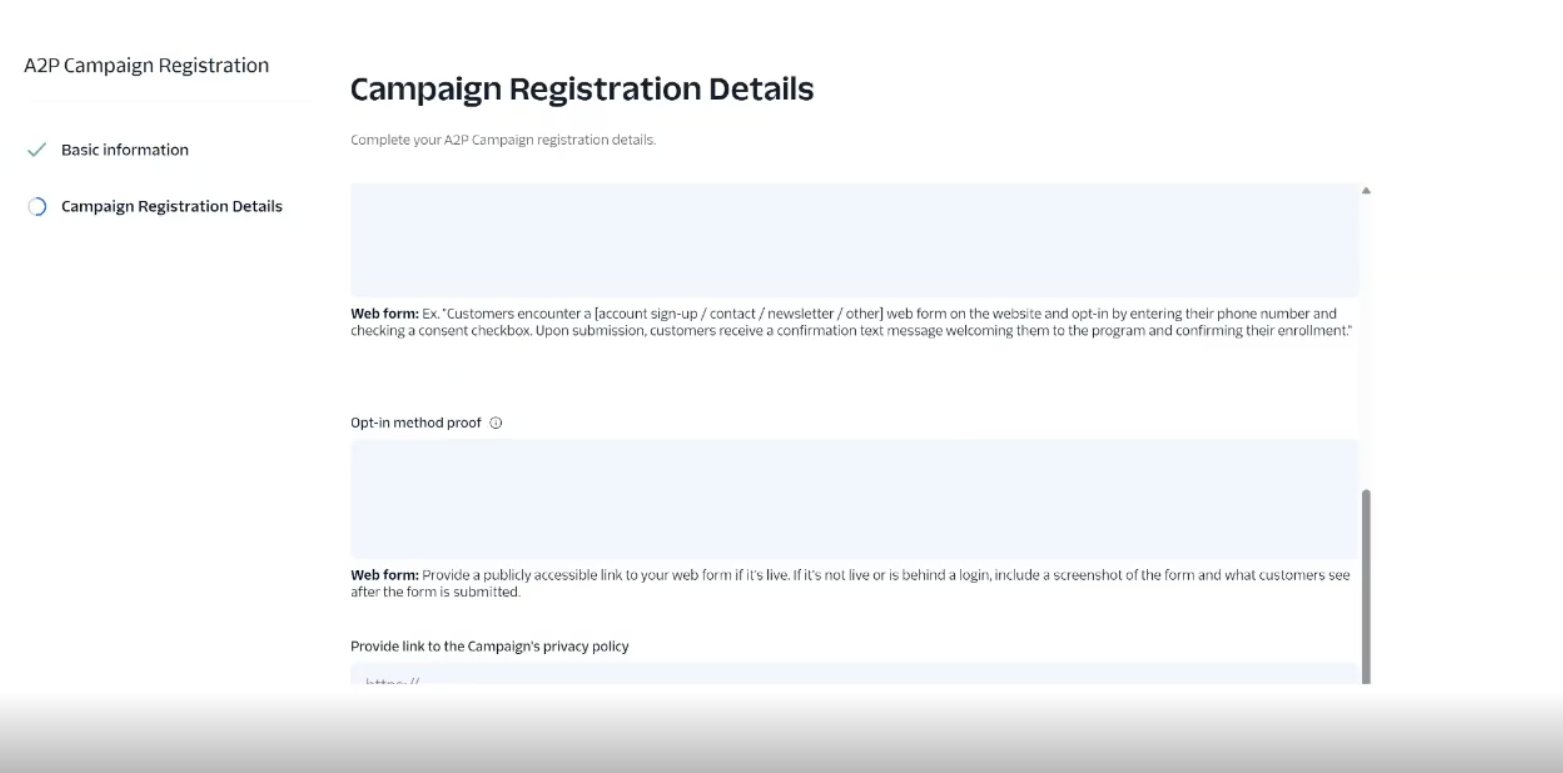
Enter the following Information
When a customer books online, [COMPANY] uses transactional SMS to help keep rental customers informed about the status of their booking (booking confirmations, pickup details, reminders, and return notices). By booking online, customers agree to opt in. SMS is not a condition of rental and customers are informed they may call or email to book if they do not want to receive SMS
Opt In Method Proof
Provide a link to the SMS Opt In form created above. Eg. www.trailercompany/sms
Privacy Policy URL
Provide a link to the Privacy Policy Page created above. Eg. www.trailercompany/privacy
Terms and conditions URL
Provide a link to the SMS Opt In form created above. Eg. www.trailercompany/SMS
Sample messages
Two samples should be entered. Samples 3 to 5 are optional and can be skipped.
Sample 1, booking confirmation:
“Dear [Customer Name], your booking with [COMPANY] is confirmed. Here is a link to your rental: [link]. Reply STOP to opt out. Message frequency varies.”
Sample 2, return reminder:
“Dear [Customer Name], your rental is due back in 2 hours. Do you need more time? Click here to view your booking and extend: [link]. Regards [COMPANY] Reply STOP to opt out. Message frequency varies”
Opt In Message
Copy the Following
Booking online requires transactional SMS about your rental - if you don't want SMS, don't book online; contact us at [PHONE] or [EMAIL] instead. Msg & data rates may apply; frequency varies. Reply STOP to opt out or HELP for help
Message Contents
Embedded links: Yes
Phone numbers in messages: No
The remaining checkboxes: NoEmbedded link sample
Twilio needs a working example link. Create a manual booking in Lockii next year and copy the Booking Link. Paste it in this field.
Review and submit.
Scroll through the summary to check every field.
Choose Check for errors rather than submitting without checking. Once the automated checks pass, click Submit registration, then click Finish so the submission is finalized.